
Download IP Display – Free IP Address Viewer for Windows, Mac, and Portable Use
Looking for a fast, secure, and lightweight way to view your IP address and network details? IP Display is a free, portable desktop utility designed to show your internal (local) and external IP addresses, gateway, hostname, and DNS server information at a glance. Developed by HazteK Software, the creators of popular tools like StorURL and Color Picker, IP Display delivers a clean, no-frills experience for users of all skill levels.
Whether you're troubleshooting network issues, setting up a router, or just curious about your network setup, this tool provides instant access to essential IP data without installing anything on your system. With just a double-click, you can launch the app and see all your network information clearly displayed in a minimalist interface. No clutter, no delays—just real-time, accurate data.
Perfect for beginners and professionals alike, IP Display is ideal for use on older machines or low-resource environments. You can also run it from a USB drive, making it a convenient choice for IT support or remote troubleshooting. Its simple design ensures zero system lag, and the “Copy All Information” feature lets you quickly share details with tech support or team members.
Best of all, it’s completely free to download and use.
Simple, Fast, and Intuitive IP Information Display
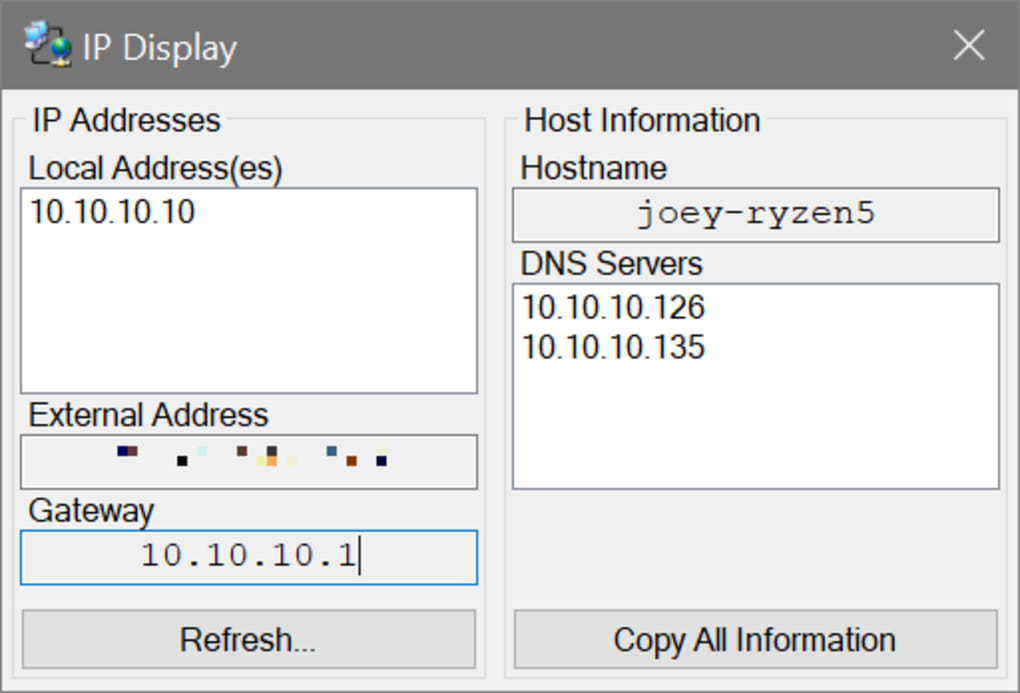
One of the standout features of IP Display is its ability to deliver comprehensive network data in a single, easy-to-read window. Upon launching the application—whether from your desktop or a portable drive—you’re immediately presented with a clean, uncluttered interface that displays your local IP, external IP, default gateway, hostname, and DNS server addresses. This instant visibility eliminates the need to open command prompts, navigate through network settings, or search online for your IP.
For users unfamiliar with technical commands like ipconfig or curl ifconfig.me, this tool is a game-changer. The interface is designed with accessibility in mind: large, readable fonts and clearly labeled fields ensure that even non-technical users can understand their network configuration at a glance. The app updates your information automatically on launch, and you can refresh it anytime with a single click of the “Refresh” button.
This is especially useful if you're working with dynamic IP addresses or have just reconnected to a new network. The “Copy All Information” feature is another time-saver—just one click and you can paste your full network details into an email, chat, or support ticket. No more manually typing out IP addresses or confusing network jargon.
For IT professionals, this means faster remote assistance and fewer errors during troubleshooting. The app runs silently in the background, consuming minimal CPU and RAM, which makes it ideal for older systems or low-end laptops. It’s also a great tool during live demos, presentations, or training sessions where you need to quickly share network details without distractions.
Portable & Cross-Platform Compatibility for Maximum Flexibility
IP Display shines as a portable software solution, meaning you don’t need to install it to use it. Simply download the executable file, place it on a USB drive, or keep it on your desktop, and run it anytime. This makes it perfect for users who frequently switch between devices or work in shared environments like libraries, offices, or help desks.
You can carry your network diagnostics tool with you and use it on any Windows machine without leaving traces or requiring admin rights. While the app is primarily designed for Windows, its lightweight nature and minimal system footprint make it compatible with most modern Windows versions, including Windows 10, Windows 11, and even older systems like Windows 7 and 8. Although the official site doesn’t list Mac or Linux support, the portable nature of the tool allows some users to run it via compatibility layers like Wine, though results may vary.
For Android and iOS users, there are no direct equivalents, but similar functionality can be found in third-party network tools. The app is also safe and secure—no ads, no bundled malware, and no data collection. HazteK Software has a solid reputation for releasing clean, reliable tools, and IP Display follows that standard.
It’s a trusted name in the software community, known for releasing tools that do one thing well and nothing else. This focus on simplicity ensures that IP Display remains fast, secure, and dependable. Whether you're a student, a remote worker, or an IT technician, having a portable IP viewer on a flash drive can be invaluable during network setup, remote access sessions, or when helping others with connectivity issues.
The fact that it’s free and open for public download makes it accessible to everyone, from beginners to advanced users.
Pros, Cons, and Frequently Asked Questions
- Pros:
- Free to download and use with no hidden costs
- Lightweight and portable—no installation required
- Instant display of local, external, gateway, DNS, and hostname data
- Simple, clean interface suitable for beginners
- One-click copy of all network information
- Low system resource usage—ideal for older computers
- Secure with no ads, trackers, or bundled software
- Cons:
- Only displays IP info—no configuration or editing capabilities
- Limited to Windows OS (no native Mac/Linux support)
- No built-in update checker (manual downloads required)
- Basic UI with no customization options
- Doesn’t support Android or iOS natively
Frequently Asked Questions (FAQ)
-
Is IP Display safe to download?
Yes, IP Display is safe to download. It’s developed by HazteK Software, a reputable developer known for clean, ad-free tools. The app is virus-free, doesn’t collect user data, and has no bundled software.
-
Can I use IP Display on Mac or Linux?
IP Display is designed for Windows only. While some users have reported success running it on Mac via Wine, it’s not officially supported. There are no native versions for Linux or macOS.
-
How do I update IP Display?
There is no automatic update feature. To get the latest version, you’ll need to visit the official HazteK Software website and manually download the newest release.
-
Can I run IP Display from a USB drive?
Yes! One of the biggest advantages of IP Display is that it’s fully portable. You can run it directly from a USB flash drive without installing anything on the host computer.
-
Does IP Display let me change my IP address?
No. IP Display is strictly a viewer tool. It only shows your current IP information—it does not allow you to modify, configure, or assign new IP addresses.
Conclusion: A Must-Have for Quick IP Checks
If you're looking for a fast, secure, and free way to view your IP address and network details, IP Display is an excellent choice. Its minimalist design, instant data retrieval, and portability make it ideal for users across all skill levels. Whether you're a student setting up a home network, a remote worker needing to share your IP for support, or an IT professional on the go, this tool delivers exactly what it promises—no frills, no bloat, just reliable information.
While it lacks advanced features like IP editing or cross-platform support, its core functionality is flawless. For those who value simplicity and speed, IP Display stands out as one of the best IP viewers available. Download it today from the official website and keep it on your USB drive for instant access whenever you need it.
It’s a small tool with big benefits—perfect for anyone who wants to stay informed about their network without the hassle.
Download IP Display now and take control of your network visibility with a single click.







